You know the feeling: “Take out bins,” “wipe the table,” “feed the cat”—all true, all important, and easy to skim past when life is loud. Chorish has always given each chore a small icon automatically, but it was our pick, not necessarily yours. Chorish now lets you set each chore’s icon and color yourself, so the picture matches how your household thinks about the task. It is playful, practical, and built for busy families and anyone sharing a home who wants chores to feel a bit more human.
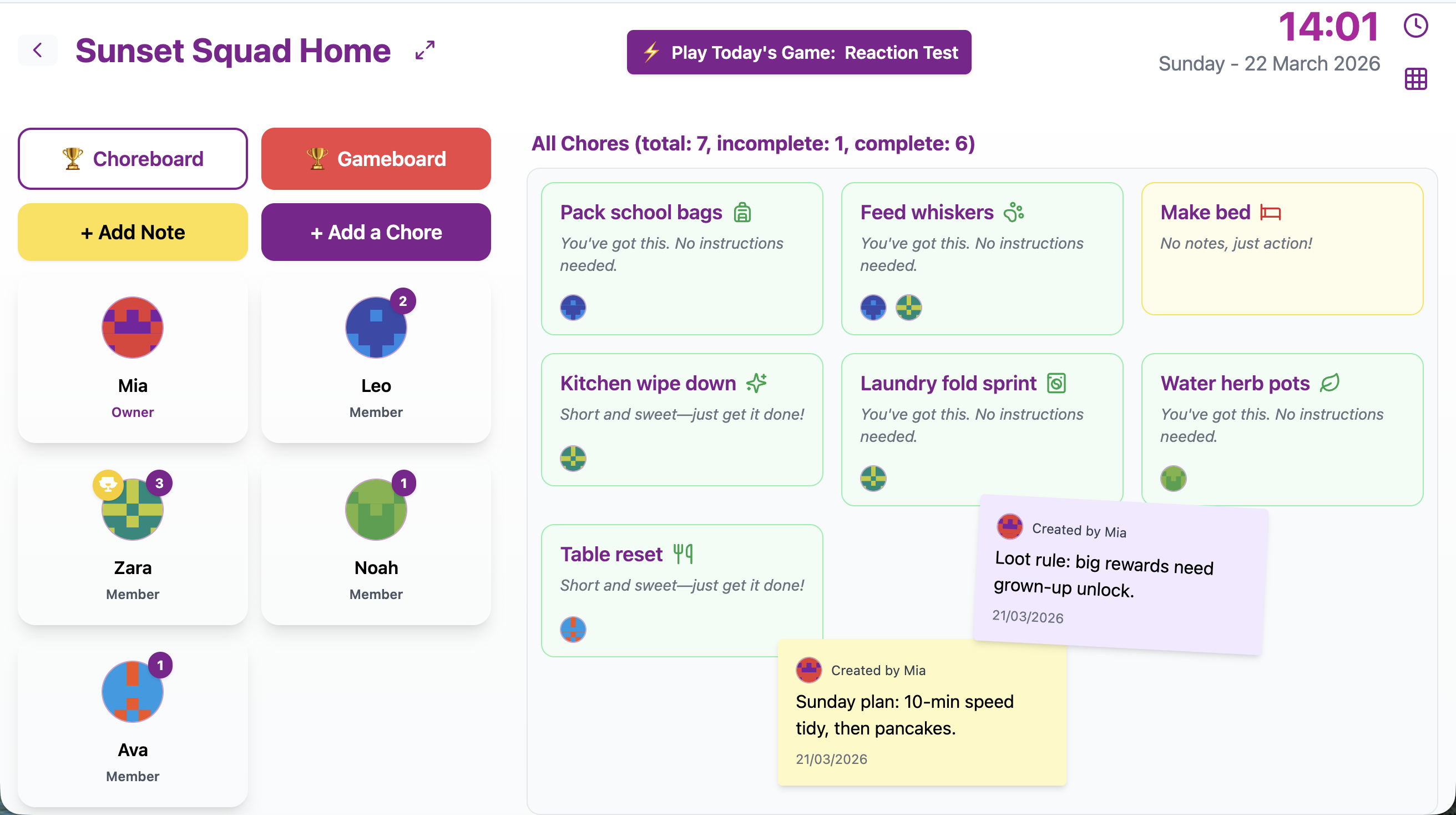
Your home dashboard: each chore shows its icon and color at a glance—then you can tune them in Manage.
What you can do now
Head to Manage → Chores, open an existing chore to edit it, and use Choose icon and color. (You won’t see this when you first create a chore—that step lives here, when you are ready to tune things.) Pick from a big, friendly library of icons sorted into themes—cleaning, kitchen, home, time and planning, outdoors, school, fun, sports, and more. Want a little book for homework, a paw print for pet jobs, or a trophy for the “whoever finishes first” challenge? Swap the automatic icon for something that fits.
Colors work the same way. Choose a spot on the palette that matches the mood of the chore, the person who usually does it, or just what makes you smile. If you need something exact—maybe it matches a bedroom wall or a team color—you can open Custom and dial in precisely the shade you want. A live preview shows you how the icon will look before you save, so there are no surprises after you click Done.
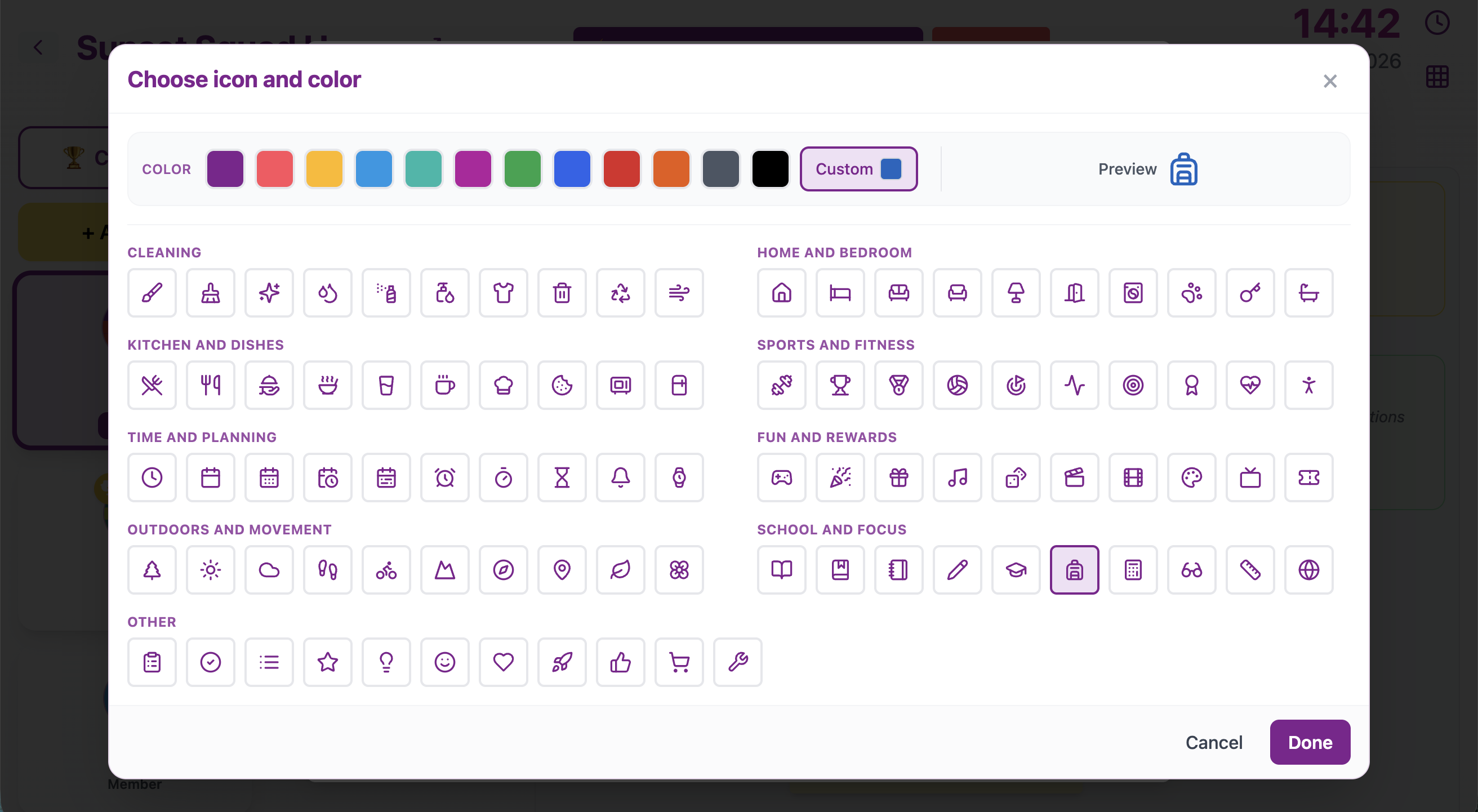
Themes, icons, preset colors, and Custom—preview it all before you tap Done.
Why it matters for real homes
Spot the important stuff at a glance. On a tablet on the kitchen counter or in the browser on your computer, a bright icon you chose yourself is faster to recognize than scanning another line of text. That helps parents juggling dinner and homework, roommates passing in the hallway, and kids who are still building the habit of checking the list.
Make chores feel a little more like yours. Maybe “dishes” gets a sparkle and “recycling” gets a leaf. Maybe every pet-related job shares one color so the whole household knows what “animal duty” means today. Small touches add up: chores do not have to feel like a spreadsheet someone else designed.
Keep the good parts of Chorish intact. You still get the Choreboard, the little daily games (Quick Quiz, Emoji Riddle, Memory Flip, Word Scramble, Spot the Difference), and the leaderboard energy—without signing up for anything new. Everything stays in your browser, touch-friendly for tablets, and as private as we can make it. Custom icons and colors are just another way to make that same simple tool fit your crew.
When a chore is finished
Here is a detail we cared about: when someone marks a chore complete, you still recognize which chore it was—the icon stays—but the color shifts to Chorish’s familiar completed look so everyone can tell “done” from “still waiting” in a heartbeat. Incomplete chores show your chosen color; completed ones celebrate in green. Same chore, same personality, clear state. No guessing.
Try it on your next edit
Open Manage → Chores, pick a chore, and edit it—Choose icon and color is where you make the swap. Try something silly, switch it tomorrow if you change your mind. The whole point is to make the list feel a little less like homework and a little more like something your household actually owns.
Ready to play? Head to Chorish.com, open your dashboard, and give your chores a face lift. For more about how Chorish works, visit our FAQ—and may your next chore be the one with the tiny dancing trophy icon.