A home command center sounds like it should involve a wall calendar, matching labels, and a lot of rules.
It does not have to be that serious.
At its best, a home command center is simply one shared spot where the family can see what matters today. Chores. Bags. Notes. School bits. A reminder about bins. Maybe a small list of quick wins before screens. It is the place everyone passes often enough that the household plan stops living entirely in one person’s head.
The key phrase is actually gets used.
Plenty of family organisation systems look lovely for three days and then quietly become a pile of old paper, dried-out pens, and one permission slip from a month ago. A useful command center is different. It is easy to see, easy to update, and simple enough that people can use it when they are tired or trying to get out the door.
Here is how to create a home command center that helps with chores and routines without becoming another thing to maintain.
Pick a spot people already pass
The best location is not always the prettiest wall.
Choose a place your family naturally walks past:
- Kitchen counter.
- Fridge door.
- Hallway table.
- Cupboard near the door.
- Shelf by school bags.
- Tablet stand in a shared space.
If the command center is tucked away somewhere neat but ignored, it will not help. It needs to be where family life already happens.
Good signs you have picked the right spot:
- People pass it in the morning.
- It is close to bags, shoes, or meals.
- Adults can update it quickly.
- Children can see it without help.
- It does not become a dumping ground immediately.
The kitchen often works because it is already a household traffic zone. But if your family does everything by the front door, use the front door area. The right spot is the one people will actually look at.
Keep the first version small
Do not start with a giant system.
A command center can grow later, but the first version should be almost too simple. If it tries to manage school admin, meal planning, chores, homework, sports kits, birthdays, pocket money, and every loose bit of household paperwork, it will become too much.
Start with three things:
- Today’s chores.
- Tomorrow’s must-not-forget items.
- One small reset list.
That is enough.
For example:
| Section | What it shows |
|---|---|
| Chores | The few jobs that matter today |
| Tomorrow | Bags, forms, lunchboxes, shoes, kit |
| Quick reset | Cups to kitchen, table wipe, clothes in basket |
Once the habit is working, you can add more. Until then, the job is to make the command center useful, not impressive.
Make chores visible, not bossy
A command center should feel like a helpful prompt, not a household noticeboard of disappointment.
Use clear, friendly wording:
- “Today”
- “Quick wins”
- “Before screens”
- “Tomorrow”
- “Done”
- “Need help”
Avoid making the list sound like a warning label for family life.
Less helpful:
- “Still not done”
- “Things I keep asking about”
- “Why is this still here?”
More helpful:
- “Pick one quick job”
- “Move it to done when finished”
- “Check before we leave”
- “One reset before bed”
The tone matters because the command center should invite people to use it. If it feels like another place to be told off, everyone will learn to ignore it.
Our guide to making chores visible without nagging has more ideas for turning reminders into shared visibility.
Decide what belongs there
A useful command center is selective.
If everything goes there, nothing stands out. Choose the things that most often cause daily friction.
Common choices include:
| Household friction | What to keep visible |
|---|---|
| Chores get forgotten | Today’s chore list |
| Mornings feel rushed | Bags, lunchboxes, water bottles |
| Evenings drift | Small evening reset list |
| Arguments about who helped | Shared progress or “done” section |
| School items vanish | Forms, kit, reading folders |
| Everyone asks what is next | One clear family plan for the day |
Try not to use the command center for long-term storage. If something has been sitting there for two weeks, it may need a real home somewhere else.
Think of this space as a dashboard, not an archive.
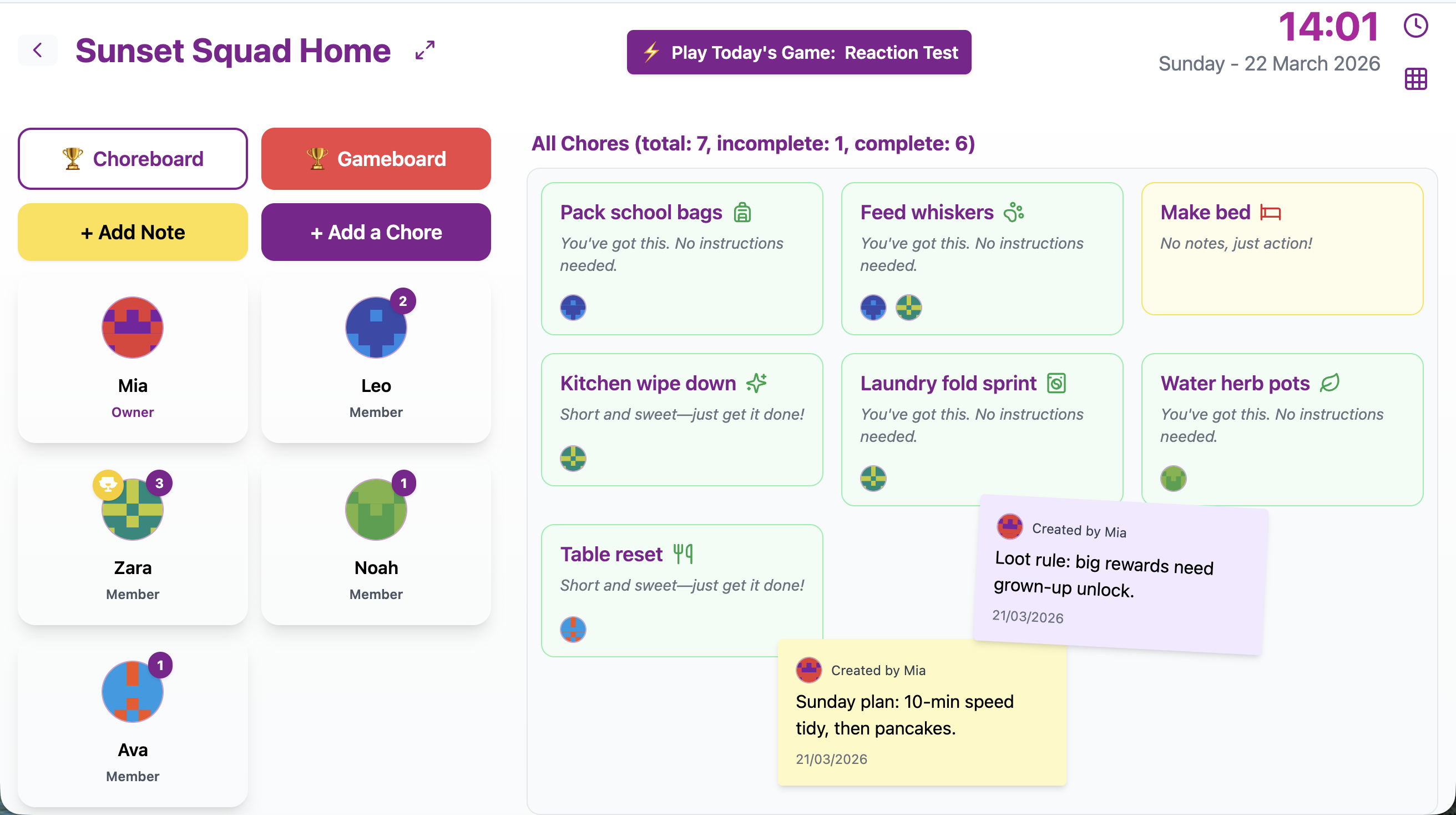
A shared dashboard gives everyone one place to check what needs doing next.
Give every item an action
One reason household systems get ignored is that they collect vague reminders.
“School” is not an action.
“Kitchen” is not an action.
“Stuff” is not an action either, even if it describes the pile accurately.
Write tasks so people know what to do:
| Vague note | Clear action |
|---|---|
| School | Put reading folder in bag |
| Kitchen | Put plates in dishwasher |
| Shoes | Put shoes by the door |
| Laundry | Clothes in basket |
| Pet | Fill water bowl |
| Table | Wipe table after dinner |
Clear actions are easier for children and adults. They also make the command center faster to scan.
If you are restarting after routines slipped, this approach pairs well with how to restart chore habits when life gets messy: choose small visible jobs first, then rebuild from there.
Create a simple “done” moment
The command center should not only show what needs doing. It should show progress too.
That could be:
- A “done” column.
- Tick boxes.
- Moving a magnet from “to do” to “done”.
- Stickers for younger children.
- Crossing off the task.
- Tapping complete on a shared digital board.
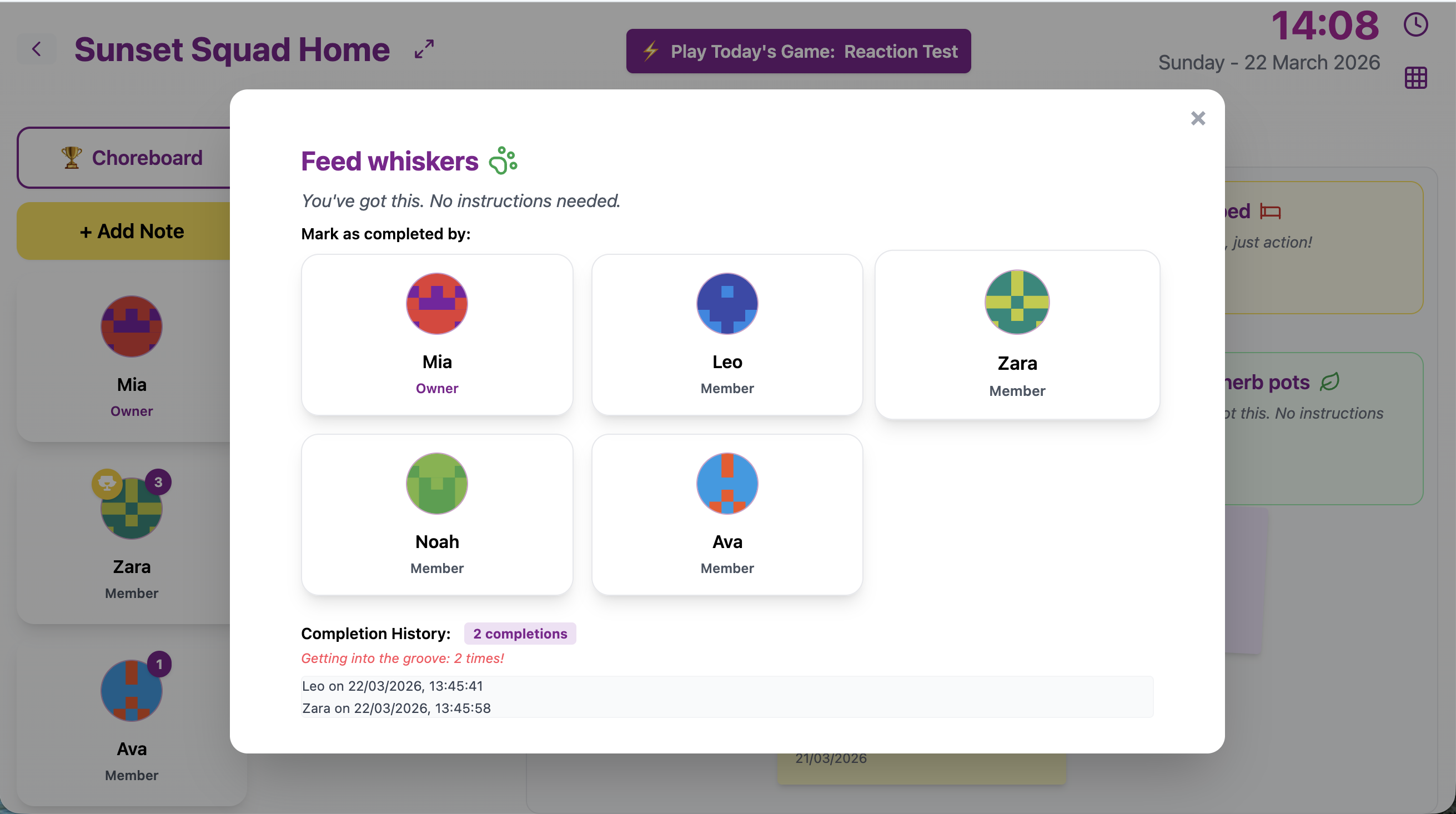
A quick completion step helps a family command center feel active rather than decorative.
The done moment matters because it closes the loop:
- See the job.
- Do the job.
- Mark it done.
- Move on.
Without that final step, chores can still feel invisible. Someone may have helped, but nobody sees it. A visible “done” section gives the whole household a small signal that progress is happening.
Make it child-friendly
If children are meant to use the command center, make sure they actually can.
That means:
- Put it low enough for them to see.
- Use pictures or icons for younger children.
- Keep wording short.
- Use colours if that helps people spot jobs.
- Avoid tiny writing.
- Make the completion step obvious.
For younger children, a command center might be mostly pictures:
- Shoes.
- Bag.
- Plate.
- Toothbrush.
- Toy basket.
For older children, simple words may be enough:
- Lunchbox.
- Reading folder.
- Table.
- Laundry.
- Pet water.
Do not expect a child to use a system that looks like adult admin. The goal is a family hub, not a small office.
Our age-appropriate chores guide can help you choose tasks that match each child’s stage.
Use the command center for routines, not just chores
Chores are only one part of daily household flow.
A command center can also support:
- Morning routines.
- Evening resets.
- School bag checks.
- Meal-time jobs.
- Screen-time agreements.
- Weekly focus chores.
- Notes for tomorrow.
For example:
| Routine | Command center prompt |
|---|---|
| Morning | Plate away, bag ready, shoes by door |
| After school | Lunchbox emptied, bag hung up |
| Before screens | One quick chore first |
| Evening | Cups to kitchen, clothes in basket |
| Weekly reset | Choose three focus jobs |
This helps the command center become part of the day rather than a separate chore chart nobody remembers.
For more routine ideas, see morning routines that actually work for busy families and evening reset routines.
Keep supplies nearby
If your command center needs a pen, keep a pen there.
This sounds too obvious, but many systems fail because the one thing needed to use them is always missing.
Useful supplies might include:
- Pens.
- Sticky notes.
- Magnets.
- Spare chore cards.
- A small tray for forms.
- A tablet charger.
- A cloth for quick table wipes nearby.
Keep the supplies minimal. The command center does not need a full stationery drawer. It just needs the basics so people can update it in the moment.
Review it once a week
Even a simple command center needs a quick reset.
Once a week, take five minutes to clear old items and update the list.
Ask:
- What is still useful?
- What is out of date?
- Which chores keep getting missed?
- Is this spot still working?
- Does the list need to be shorter?
This does not need to be formal. You can do it during a Sunday reset, after dinner, or whenever the board starts looking tired.
Our guide to running a weekly family reset without a lecture has a simple structure for this kind of check-in.
Avoid the common command center traps
Here are a few ways command centers go wrong:
| Trap | Better approach |
|---|---|
| Too many sections | Start with chores, tomorrow, and quick reset |
| Too much adult writing | Use icons, colours, and short labels |
| No completion step | Add a simple done column or tick |
| Hidden location | Put it somewhere people already pass |
| Never updated | Review once a week |
| Becomes a dumping ground | Give papers and items a real home |
If your first version gets messy, that is not failure. It is feedback. Shrink it, move it, or remove anything nobody uses.
A simple first-week setup
Try this:
- Pick one visible spot.
- Choose three sections: chores, tomorrow, quick reset.
- Add three to five tasks in each section.
- Make every task a clear action.
- Add a simple way to mark things done.
- Keep a pen, magnet, or charger nearby.
- Review after one week.
Here is an example:
| Section | Example items |
|---|---|
| Chores | Feed pet, table wipe, laundry basket |
| Tomorrow | Bag packed, water bottle, shoes by door |
| Quick reset | Cups to kitchen, sofa reset, books away |
Keep it small for the first week. The best command center is not the one with the most sections. It is the one your family actually checks.
Make the household plan easier to see
A home command center is not about controlling every minute of family life.
It is about making the next helpful action easier to see.
When chores, reminders, and small routines live in one shared spot, there is less need for one person to carry the whole plan. Everyone can check what matters. Everyone can see progress. Everyone has a clearer way to help.
If a browser-based shared board would suit your home, Chorish is free, simple, and does not require a sign-up. A whiteboard, fridge chart, or sticky-note station can work too. Choose the setup your household will actually notice, keep it small, and let it become part of the room.